


In the first post in this series I showed how I created a custom ‘Sip/Puff’ device using a air pressure sensor and Arduino Nano Microcontroller interfaced with the the Archer Electronic gear shifting module to trigger the gear shifts. This first prototype is still working well especially considering that it was designed and built in about a week.
In this second post I want to show how this concept has developed further into a smaller and arguably simpler standalone remote device and show some of the challenges I came across as well as what extra features that I have added to this version, having gained some valuable feedback from David and Simon.
So why did I decide to redesign this?
Well the main issue with the previous device was that you need to purchase an Archer Drop bar remote, and then take out its internal circuit board to trigger the D1X shifter attached to the bike derailleur. This proved to work fine but is a costly option.
While building the first version I noticed the circuit board had a tiny Bluetooth LE logon on it, and immediately I realized that the drop bar remote and the D1X trail shifter were working over Bluetooth LE (considering you use a mobile app to configure it I should have realised this sooner!).

I thought It should therefore be possible to build my own remote by using a microprocessor that also supports Bluetooth Low Energy connections, and eliminate the need to use the Archer Drop bar remote circuit board all together!
Introducing the ESP32 Micro controller
The ESP32, is great little microprocess and not only fully supports Bluetooth LE, but also has WIFI support, two core CPU and plenty of I/O to connect to my pressure sensor, interface with buttons and even small LCD screens.
In fact there are of the shelf units that have done the hard work for me and already include two buttons and a screen and so to make things even easier I chose the LilyGo T-Display S3 as the main development platform for this version 2 device.
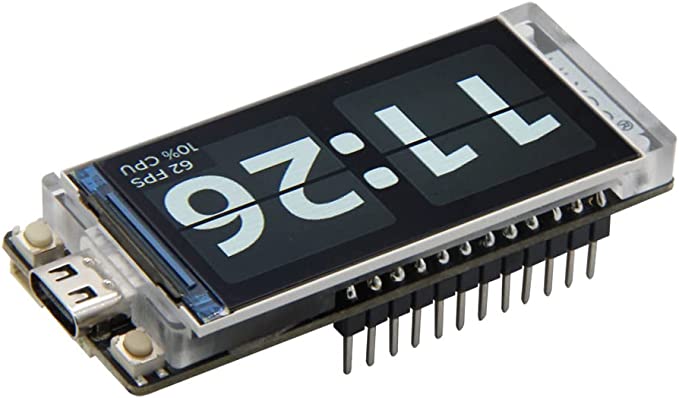
I chose to use the standard non touch screen version of the T-display S3 as I don’t find touch screens very useful for bike applications, and in this case the main interface is via the pressure sensor, the screen is mainly for clear visual feedback which was something we found was tricky with the first version
so without going into too much technical detail the process was as follows.
Step 1 Reverse Engineer the Bluetooth protocol Archer remote use
The first step turned out to be a bit easier than I was expecting and by using a Bluetooth sniffer and some patience I could sniff the commands being used to control the shifter and could put a list together to replicate this in my code.
(Hint the trick here was to use the Archer phone app to control the shifter whilst using the Bluetooth sniffer to capture the Bluetooth packets being transmitted and see what values had been changed. This allowed me to slowly gain an understanding of what Bluetooth ‘Service Identifiers (UUID’s) ‘ are used for what and make some notes.
While testing this I found out how to query the following from the shifter.
1. The current gear it was currently set to
Usful on first startup as forcing the device to shift to say first gear is not good on the drive chain
2. The maximum number of gears it was setup for
Very important to know automatically how many gears to shift to not all bikes we run this on will have the same number of gears
3. The current shifter battery level
A crucial thing to know while out on a long ride! So often we have started to have issues and found the batteries are flat, that standard shifters don’t indicate the battery life in any way this can only be found using the phone app usually
I haven’t worked out what all the UUIs’ represent yet but ultimately it should be possible to simulate anything the phone app does.
Step 2 Program the Lilygo T-display s3 to send the correct commands over Bluetooth to trigger the gear changes
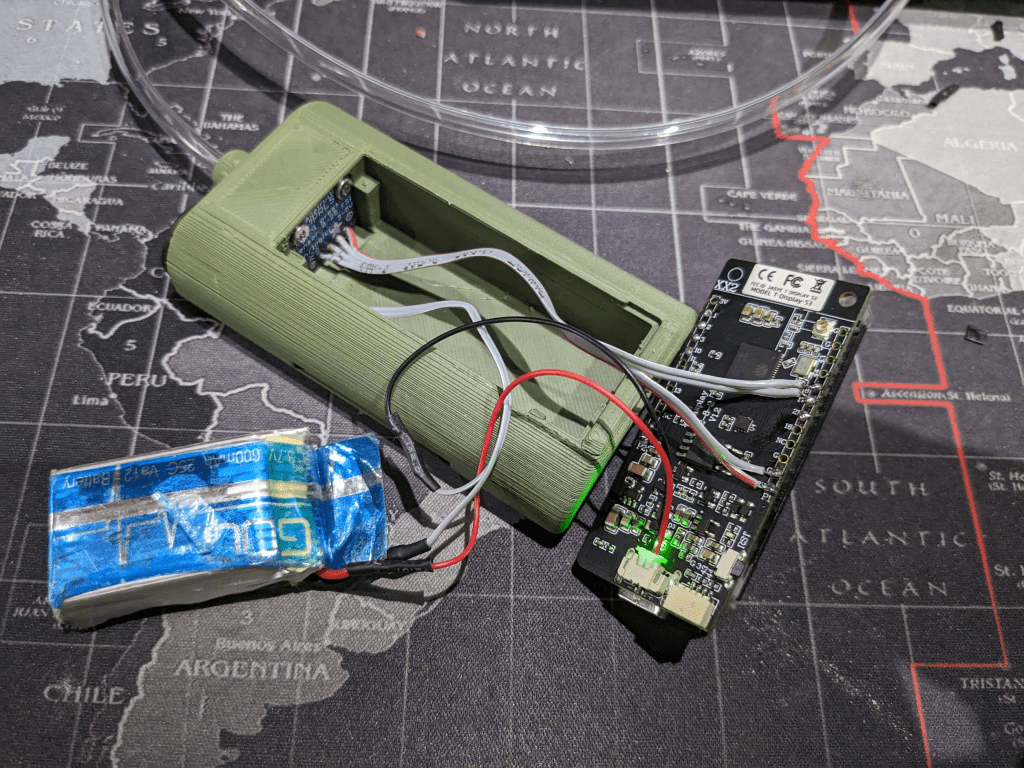
In the photo above you can se ethe battery, Lilygo dev board and Pressure sensor wired together ready to be programedOnce I knew what Bluetooth UUID’s did what I started with a simple program to simply connect to a specific Archer Shifter and send the relevant command to go up the gears one at a time. This proof of concept worked out of the box and soon I had developed the code to build my own standalone shifter that has can do the following change the gear by either lightly sipping on a tube or blowing.
I designed the screen layout so the left side represents the Archer shifter Graphically showing the battery life (disconnected in the video above) and the right side shows the pressure sensor readings so the user can easily add or remove pressure to put touch either the up or down gear icons to trigger a gear change.
Also holding the pressure in the up or down gear spot triggers fast shifting up or down gears. The right hand section also shows the units own battery level.
The first issue I had was with Automatic recalibration of the Air pressure to take account of Elevation changes. we soon discovered you only had to ride up or down a few hundred meters and the center point would drift enough to trigger a constant gear change. This was resolved in Code, by taking regular readings and comparing them to previous readings . if a small change was detected ( too small for a person to make) then this would then signify a drift in ambient air pressure and the center point was re-calibrated. this worked really well, and now we could ride up and down large hills and the unit always re-calibrated successfully.
I also wanted to make the unit a small form fact that can be worn on an arm or mounted on the bike so the rider can see it working and can also see when it needed to be charged
I have also developed a none pressure sensor version that I personally use with external buttons to change the gear on the trailer bike and see what gear it is in ( something I was not able to do with the standard remote shifter)

I also added in a simple saliva trap made using a small bit of foam and a 3d printed connector. which so far has proven to stop any moisture going anywhere near to the pressure sensor!
 Empowered People
This is fantastic! Please post your source code on GitHub or otherwise make it available as it would save others a lot of time in reverse engineering the BT protocol.
LikeLike